Instagram Friend Map vs. Old Foursquare: Where They Meet and Where They Don’t

Instagram is buzzing with a new tool: the Instagram friend map. This feature lets people see where their friends are checking in or visiting, similar to pinning moments on a digital map.
With usage rising fast, debates about privacy are swirling. For longtime social media users, it might ring a bell — remember Foursquare, the app famous for turning locations into social hotspots? (It’s now called the Swarm app.)
I do remember checking in at different places back in the day, before privacy issues became a significant concern.
Let’s unpack how Instagram’s new map echoes Foursquare’s early days, and where they take different roads.
What is the New Instagram Friend Map?
The Instagram friend map is a social feature that displays the places your friends have visited or recently checked in to.
You can open it from the Instagram app, where it displays a map showing friends’ recent locations and activities.
- Easy access: Tap the map icon on your profile or the explore tab.
- Display options: See locations your friends have shared, including posts or stories linked to those spots.
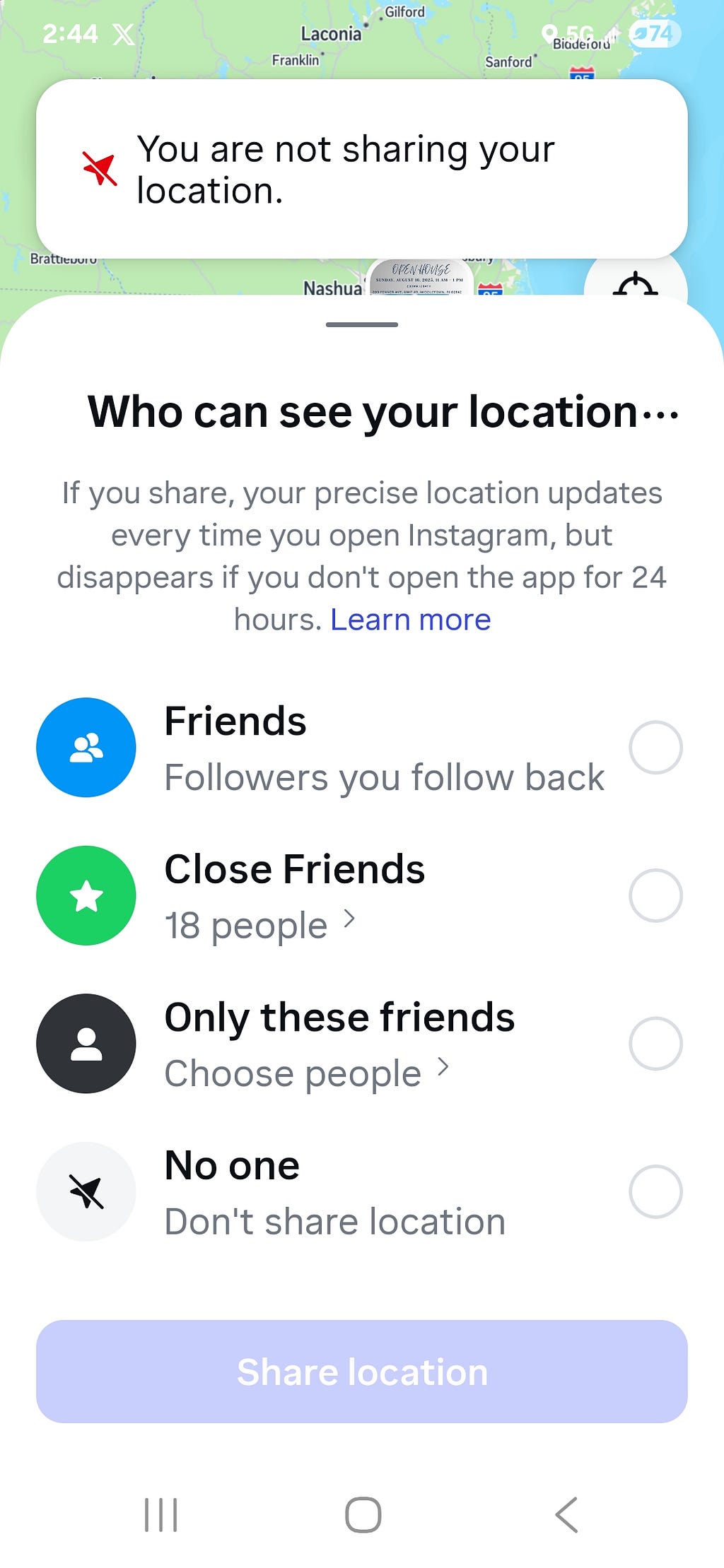
- Privacy talk: The friend map has kicked off concerns about who can see your whereabouts, what’s publicly visible, and how much control you have. Instagram allows users to choose who sees their location updates, but the settings aren’t always straightforward.
For Instagram fans, this map is more than a travel diary. It’s about feeling connected and a bit nosy — in a good way.
A Look Back: Foursquare’s Social Location Sharing
Foursquare was the app that made checking in cool. Launching in 2009, it allowed users to “check in” at bars, shops, and parks, earning badges and currency with every stop.
Key features included:
- Check-ins: Share your exact location with friends or the world.
- Badges & Mayors: Unlock digital trophies for exploring. Frequent visitors could become the “mayor” of their favorite cafe.
- Social sharing: Post check-ins to Facebook and Twitter, making location a part of your social identity.
Foursquare didn’t just put users on the map. It built a playful community around real-world activities.
Comparing the Instagram Friend Map and Foursquare
The Instagram friend map borrows a page from Foursquare’s playbook, but plenty of things set them apart. Let’s break it down.
User Experience and Engagement
- Instagram Friend Map: Focuses on current content. Posts, reels, and stories can be tied to places where friends have been. It feels visual and immediate, helping you see where friends hang out.
- Foursquare: Leaned on “check-in culture.” Users created their patterns — some raced to top the “mayor” leaderboard, others built a public diary of their movements.
- Motivation: Instagram users connect over shared spots, memorable trips, or trending places. Foursquare drove exploration through badges and friendly competition.
Privacy and Security Considerations
- Instagram: Privacy controls are available, but navigating the settings can be confusing. Shares can go public quickly if you’re not careful. Users must actively manage who can see their location or connected posts.
- Foursquare: Visibility was by choice. You could choose whether friends, everyone, or no one saw your location for each check-in. Still, regular use exposes patterns over time.
- Lesson: Both platforms ask you to trust them with your locations, sometimes more than you realize.
Social Interaction and Community Building
- Instagram: The friend map is less about shout-outs and more about visual tracking. It’s a new way to discover connections and spark conversations (“Hey, you visited that coffee spot, too!”).
- Foursquare: Used gamification to drive interaction. Leaderboards, badges, and tips from other users built a mini-community at every location.
Key Differences and Lessons for Instagram Users
- Foursquare made location social, but also temporary — locations were shared in the moment, not for long-term viewing. Instagram can keep location data searchable for years. (And now posts can be seen on Google if you keep them public.)
- Instagram weaves location with content — photos, videos, and stories stick around, which means your digital footprint grows.
- Privacy should be a habit: Check and update your privacy settings regularly. Control your audience for each post or story linked to a place.
- Social trust: Share your location only with trusted followers or friends. Don’t be afraid to adjust settings anytime your comfort level changes.
Instagram users can learn a lot from Foursquare’s history. Trends change, but protecting your digital safety should be standard practice.
Conclusion: Instagram Friend Map — Is It Worth It?
The Instagram friend map has revived the magic of shared location, with a modern twist. It brings us closer, but it also brings new questions about privacy and sharing. (Especially for children!)
Foursquare taught us that mapping your social life is fun, but can be risky if you don’t set boundaries.
Stay curious and stay smart. Know who can see your updates, and think before sharing your exact location.
You call the shots — enjoy connecting, but keep control of your and your children’s privacy every step of the way.
Labels: lisapats
posted by Jao @ August 12, 2025
0 Comments


0 Comments:
Post a Comment
Subscribe to Post Comments [Atom]
<< Home