autoStockist review: preventing stockouts on Shopify (features, setup, pitfalls)

If you’re an ecommerce entrepreneur, chances are you’ve faced the dreaded stockout. You know, that moment when a customer wants to buy a product, but you have to say “sorry, we’re out”? It’s not just a missed sale; it’s a lost opportunity and potentially a frustrated customer. This article is for anyone looking to understand how to prevent stockouts effectively on Shopify, and how autoStockist can help you do just that.
- Understand why preventing stockouts is crucial for your business.
- Learn what features to look for in a stock management app.
- Get a practical setup checklist to get started.
- Avoid common pitfalls that can lead to missed alerts.
Why preventing stockouts matters (and the hidden cost of stockouts)
Preventing stockouts is not just about keeping your shelves full; it’s about maintaining customer satisfaction and loyalty. A stockout can lead to a loss of revenue, erode customer trust, and even push them toward competitors. Besides the immediate financial impact, stockouts can also hurt your brand’s reputation.
Imagine a customer finds a product they love, only to discover it’s unavailable. Frustration sets in, and they might just decide to shop elsewhere. The hidden costs of stockouts can add up quickly, including:
- Lost sales opportunities
- Increased customer service inquiries
- Damage to customer loyalty
What to look for in an app for preventing stockouts
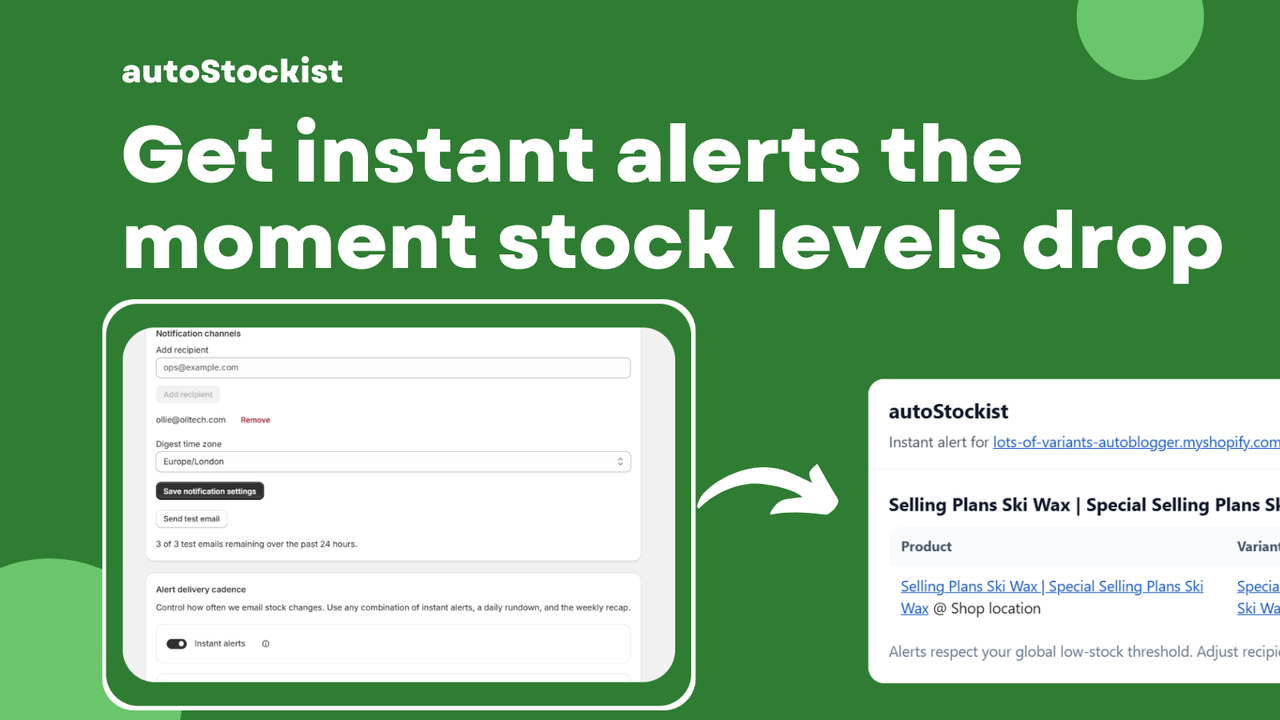
- Instant alerts when products become low or out of stock.
- A simple dashboard showing all low and out-of-stock items.
- Daily and weekly email digests summarising stock that needs attention.
- Predictive restock suggestions based on recent activity.
- Estimated dates for when products are likely to run out.
- Time-saving features that reduce manual checks.
- Team collaboration tools for clear inventory management.
A simple alert strategy (instant vs daily digest)
When it comes to alerts, you have options. Instant alerts notify you immediately when stock levels hit a certain threshold. This is great for businesses that need real-time information and can act quickly. However, it can lead to alert fatigue if you receive too many notifications.
On the other hand, a daily digest summarizes your stock status at the end of the day. This can be less overwhelming and allows for a more strategic approach to inventory management. You can review the entire situation at once, making it easier to plan your next steps.
Depending on your business model and team size, you might find a combination of both strategies works best. autoStockist offers flexibility in this regard, allowing you to tailor alerts to your needs.
Common pitfalls (noise, missing thresholds, team workflows)
Even with a robust system in place, there are pitfalls to watch out for. Here are some common issues:
- Noise: Too many alerts can cause important notifications to be overlooked.
- Missing thresholds: Setting thresholds too high or too low can lead to stockouts or overstocking.
- Team workflows: If team members are not aligned on inventory management processes, it can lead to chaos.
To avoid these pitfalls, it’s essential to establish clear communication within your team and regularly review your alert settings. Make sure everyone understands their role in inventory management to keep operations smooth.
How to keep inventory ops clean as you scale
As your business grows, so does the complexity of your inventory management. Here are some tips to keep your operations running smoothly:
- Regularly review your stock levels and adjust thresholds as needed.
- Use inventory management tools that integrate seamlessly with your sales platform.
- Train your team on best practices for inventory checks and alerts.
- Utilize forecasting tools to predict demand and adjust stock levels accordingly.
By implementing these strategies, you can scale your inventory operations while minimizing the risk of stockouts.
Setup checklist
- Install autoStockist from the Shopify App Store.
- Connect your store and allow the app to access your inventory data.
- Set your low stock thresholds for each product.
- Choose your alert preferences (instant, daily digest, or both).
- Review the dashboard and familiarize yourself with the layout.
- Train your team on how to use the app and respond to alerts.
- Regularly check your settings and adjust as your inventory needs change.
FAQ
What is autoStockist?
autoStockist is an inventory management app designed to help Shopify store owners prevent stockouts by providing alerts and insights on low and out-of-stock products.
How does autoStockist send alerts?
autoStockist sends alerts via instant notifications or daily email digests, depending on your preferences, allowing you to stay updated on your inventory status.
Can I customize alert thresholds?
Yes, you can set custom low stock thresholds for each product to ensure you receive alerts at the right time.
Does autoStockist provide restock suggestions?
Yes, the app offers predictive restock suggestions based on recent sales activity, helping you plan your inventory more effectively.
Is there a mobile version of autoStockist?
Currently, autoStockist is primarily designed for desktop use, but you can access your Shopify admin on mobile to check your inventory status.
Can multiple team members use autoStockist?
Yes, you can grant access to multiple team members, ensuring everyone involved in inventory management can stay aligned.
What if I encounter issues with the app?
You can reach out to the autoStockist support team for assistance, and they will help you troubleshoot any issues you may encounter.
In conclusion, preventing stockouts is essential for maintaining customer satisfaction and ensuring smooth operations. With tools like autoStockist, you can take control of your inventory and avoid the pitfalls that lead to stockouts. So why not give it a try and see how it can benefit your Shopify store?
Want to try it? Take a look at autoStockist on the Shopify App Store.
Labels: ohermans1
posted by Jao @ July 01, 2026
0 Comments


0 Comments:
Post a Comment
Subscribe to Post Comments [Atom]
<< Home