Best free Shopify app for out of stock alerts: is autoStockist enough?
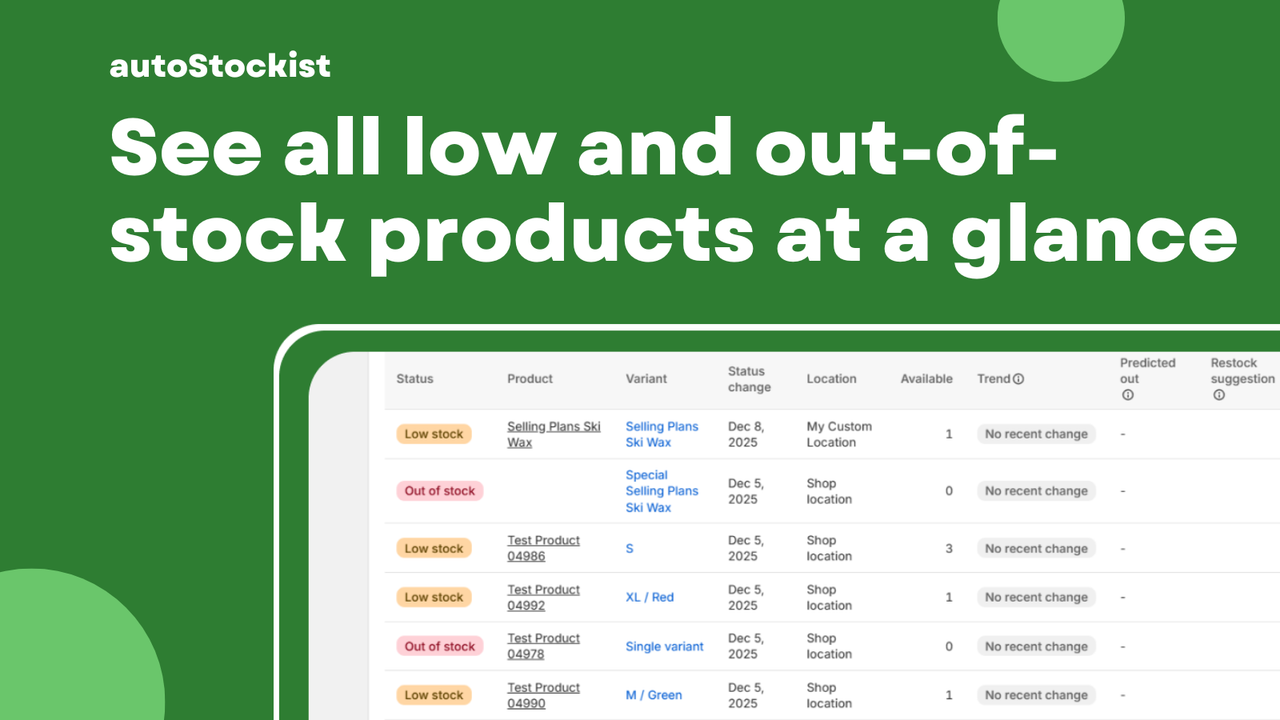
If you’re running an eCommerce store, chances are you’ve felt the frustration of dealing with out of stock alerts. Not only can stockouts lead to lost sales, but they can also tarnish your brand’s reputation. This article is for Shopify merchants looking to streamline their inventory management and avoid the pitfalls of running out of stock. We’ll explore the importance of out of stock alerts and see if the autoStockist app is enough to keep your inventory in check.
- Understand why out of stock alerts are crucial for your business
- Learn what features to look for in an app
- Get practical tips on setting up autoStockist
- Avoid common pitfalls that can hinder your inventory management
Why out of stock alerts matter (and the hidden cost of stockouts)
Imagine a customer landing on your store, excited to buy that trendy new gadget you’ve been promoting. They add it to their cart, only to find out it’s out of stock. Not only have you lost a sale, but you’ve also likely lost a customer. The hidden costs of stockouts can be significant, including:
- Lost revenue from missed sales
- Damage to customer trust and loyalty
- Increased operational costs from last-minute restocking
Having an effective out of stock alert system in place means you can proactively manage your inventory, ensuring that you never miss a sale due to stockouts. With tools like autoStockist, you can track low and out-of-stock products efficiently, allowing you to stay ahead of potential issues.
What to look for in an app for out of stock alerts
- Instant alerts for low and out-of-stock items
- A user-friendly dashboard to view inventory status
- Daily and weekly email summaries for easy tracking
- Predictive restock suggestions based on sales trends
- Estimated run-out dates for better planning
When evaluating apps like autoStockist, these features can make a significant difference in how effectively you manage your inventory and respond to stock levels.
A simple alert strategy (instant vs daily digest)
One of the key decisions you’ll need to make is how you want to receive alerts. You can choose between instant notifications or daily digests. Instant alerts keep you on your toes, providing real-time updates when stock levels drop. This is great for businesses that need to act quickly. However, if your team prefers a less chaotic approach, a daily digest might be more appropriate. This allows you to review all low and out-of-stock items in one go, minimizing distractions throughout the day.
Common pitfalls (noise, missing thresholds, team workflows)
While setting up out of stock alerts can be beneficial, there are common pitfalls to watch out for:
- Noise: Too many alerts can lead to alert fatigue, causing important notifications to be overlooked.
- Missing thresholds: Setting inappropriate thresholds for alerts can lead to either too many notifications or missing critical ones.
- Team workflows: If your team is not aligned on how to respond to alerts, you may end up with confusion and inefficiency.
To avoid these issues, ensure that your alert settings are tailored to your business needs and that your team has a clear plan for handling notifications.
How to keep inventory ops clean as you scale
As your business grows, maintaining clean inventory operations becomes increasingly important. Here are some strategies to keep your inventory in check:
- Regularly audit your inventory to identify slow-moving items.
- Implement a consistent restocking schedule based on sales patterns.
- Utilize inventory management tools like autoStockist to automate alerts and reduce manual checks.
By maintaining organized inventory operations, you can scale your business without the stress of stockouts or overstocking.
Setup checklist
- Install the autoStockist app from the Shopify App Store.
- Configure alert settings based on your business needs.
- Set up daily or instant alerts according to team preferences.
- Review the dashboard for an overview of low and out-of-stock items.
- Schedule regular inventory audits to keep track of stock levels.
Following this checklist will help you set up autoStockist effectively, ensuring that you can manage your inventory with ease.
FAQ
What is autoStockist?
autoStockist is a Shopify app that helps you manage your inventory by providing alerts for low and out-of-stock products, along with predictive restock suggestions.
Is autoStockist free?
Yes, autoStockist offers a free version, making it accessible for Shopify merchants looking to improve their inventory management without breaking the bank.
Can I customize alert thresholds in autoStockist?
Yes, you can customize alert thresholds to suit your business needs, ensuring that you receive notifications at the right times.
How often will I receive alerts?
You can choose to receive instant alerts or daily digests, depending on your preferences and the needs of your team.
What happens if I miss an alert?
autoStockist provides a dashboard where you can review all low and out-of-stock items, ensuring you can catch up on any missed alerts.
Does autoStockist integrate with other apps?
autoStockist is designed to work within the Shopify ecosystem, but specific integration capabilities may vary. Check the app’s documentation for more details.
Can autoStockist help me predict when items will run out?
Yes, one of the key features of autoStockist is its ability to provide estimated run-out dates based on recent sales activity, allowing for better inventory planning.
In conclusion, if you are looking for a way to streamline your inventory management and avoid stockouts, autoStockist could be a valuable tool for your Shopify store. By implementing effective out of stock alerts, you can not only save time but also enhance your customer experience. So why not give it a try? Your future self (and your customers) will thank you!
Want to try it? Take a look at autoStockist on the Shopify App Store.
Labels: ohermans1
posted by Jao @ July 19, 2026
0 Comments


0 Comments:
Post a Comment
Subscribe to Post Comments [Atom]
<< Home